

In 2026, AI will be necessary in the creation of content as more content, more quickly, and on more platforms are expected to be generated by creators. Blogs, videos, reels, podcasts, and newsletters are just a few of the areas in which AI tools can be used to facilitate every creative step. This guide is intended to help writers, video creators, and marketers, as well as solopreneurs, work smarter without losing any originality. These are tools that were picked according to actual creator applications, usefulness, dependability, and prevalence among the professionals.
What Content Creators Need From AI Tools in 2026
In the year 2026, content creators require AI tools that do not compromise on speed to achieve quality. Coherence is now more than ever crucial, particularly if you are publishing on a daily basis or on various platforms. Multi-format creation is also a requirement of creators, as a single idea can be transformed into text, video, audio, and visuals. The integration of the workflow is essential because tools should be compatible with the existing systems. Lastly, it has to be ethical, unique, and brand-controllable, so AI will not eliminate the element of creativity in favor of the voice of a creator.
How to Choose the Right AI Tool for Your Content Workflow
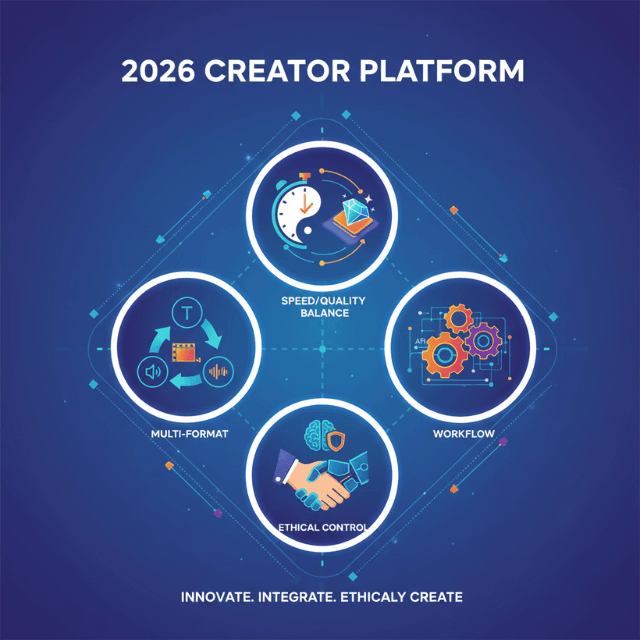
When selecting the appropriate AI tool, it is essential to begin with the knowledge of who you are as a creator. Individual artists frequently demand everything under one roof, whereas groups take advantage of group functions and automation. The focus on the platform is also important since certain tools work best with blogs, whereas others perform better with short-form video or newsletters.
Free tools can be used to test, whereas paid ones are reliable, fast, and have sophisticated functions. The creators also need to strike a balance between automation and creative control, where AI will only help but not completely take over human decision-making.
25 Best AI Tools for Content Creators in 2026
Tool #1: ChatGPT
- Best for: Writing ideas
- Core AI features: Idea generation, rewriting, outlining, tone control
- Content formats supported: Blogs, scripts, captions
Tool #2: Jasper
- Best for: Marketing copy
- Core AI features: Brand voice, templates, long-form writing
- Content formats supported: Blogs, ads, emails
Tool #3: Copy.ai
- Best for: Short copy
- Core AI features: Workflow automation, prompts, team collaboration
- Content formats supported: Social posts, emails
Tool #4: Notion AI
- Best for: Organization
- Core AI features: Summarization, planning, task automation
- Content formats supported: Notes, outlines
Tool #5: Canva
- Best for: Visual design
- Core AI features: Magic Design, text-to-image, resizing
- Content formats supported: Graphics, presentations
Tool #6: Midjourney
- Best for: Art visuals
- Core AI features: Text-to-image, artistic styles, realism
- Content formats supported: Images, thumbnails
Tool #7: DALL·E
- Best for: Custom images
- Core AI features: Prompt-based image creation, edits
- Content formats supported: Images, illustrations
Tool #8: Runway
- Best for: Video editing
- Core AI features: Background removal, generative video
- Content formats supported: Videos, shorts
Tool #9: Pictory
- Best for: Video repurposing
- Core AI features: Script-to-video, captions, highlights
- Content formats supported: Shorts, long videos
Tool #10: Descript
- Best for: Podcast editing
- Core AI features: Text-based editing, overdub voice
- Content formats supported: Podcasts, videos
Tool #11: Synthesia
- Best for: Faceless videos
- Core AI features: AI avatars, voiceovers, templates
- Content formats supported: Explainer videos
Tool #12: ElevenLabs
- Best for: Voiceovers
- Core AI features: Natural speech, voice cloning
- Content formats supported: Audio, videos
Tool #13: Murf AI
- Best for: Narration
- Core AI features: Studio voices, tone control
- Content formats supported: Audio, ads
Tool #14: Grammarly
- Best for: Editing
- Core AI features: Grammar, tone, clarity suggestions
- Content formats supported: Text content
Tool #15: Hemingway Editor
- Best for: Simplifying writing
- Core AI features: Readability scoring, clarity checks
- Content formats supported: Articles, blogs
Tool #16: Surfer SEO
- Best for: SEO writing
- Core AI features: Keyword analysis, content scoring
- Content formats supported: Blogs, articles
Tool #17: Frase
- Best for: Content research
- Core AI features: SERP analysis, outlines
- Content formats supported: Blog posts
Tool #18: Ahrefs
- Best for: Keyword research
- Core AI features: Search intent, competitor analysis
- Content formats supported: Blog planning
Tool #19: Buffer
- Best for: Scheduling
- Core AI features: Caption suggestions, analytics
- Content formats supported: Social posts
Tool #20: Hootsuite
- Best for: Social teams
- Core AI features: Scheduling, monitoring, insights
- Content formats supported: Social media
Tool #21: Zapier
- Best for: Automation
- Core AI features: Workflow triggers, integrations
- Content formats supported: Publishing workflows
Tool #22: Opus Clip
- Best for: Short-form clips
- Core AI features: Auto highlights, captions
- Content formats supported: Reels, Shorts
Tool #23: CapCut
- Best for: Mobile editing
- Core AI features: Auto captions, effects
- Content formats supported: Short videos
Tool #24: Substack
- Best for: Newsletters
- Core AI features: Writing assistance, audience tools
- Content formats supported: Emails, blogs
Tool #25: Beehiiv
- Best for: Creator newsletters
- Core AI features: Growth tools, analytics
- Content formats supported: Newsletters
How Creators Are Using These AI Tools Together
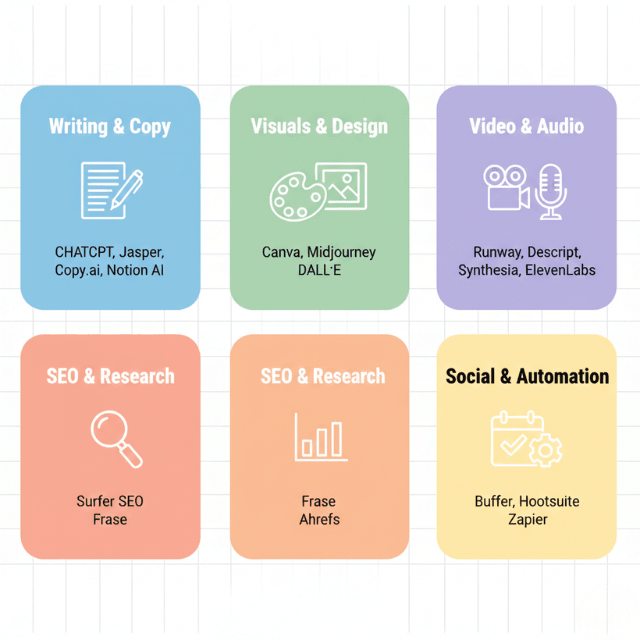
In 2026, creators will not use a single AI tool as often. A typical workflow begins with an AI-generated idea, comes next, then there is writing, optimization of the article through SEO, and creation of visuals. Video AI tools are used to repurpose long-form content into short videos, reels, and posts. Scheduling and publication are carried out by the tools of automation, and creators work on telling the stories. The most successful creators are AI partners, but not replacements.
Common Mistakes Creators Make With AI Tools
Automation has been overused by many creators, producing generic content that is not very personality-driven. Another critical error is the neglect of brand voice since people can quickly see a discrepancy. There is also a prevalence of tool overload when creators subscribe to the majority of platforms without a clear plan. AI is most effectively used when the tools are not randomly chosen, but used to complement and not to displace human creativity.
FAQs
Are AI tools replacing content creators in 2026?
No, AI supports creators by improving speed and efficiency, not replacing originality.
Do AI-generated content tools affect SEO?
Yes, positively, if content is helpful, original, and human-edited.
Can beginners use these AI tools effectively?
Absolutely. Many tools are beginner-friendly and template-based.
How much should creators budget for AI tools?
Most creators spend $50–$200 monthly, depending on needs.
Which AI tools are best for short-form video creators?
Runway, Opus Clip, CapCut, and Pictory are top choices.
Conclusion
The purpose of a smart AI tool stack in 2026 is to build tools that suit your workflow and creative objectives. Begin small and concentrate on quality and automation slowly at a time. The future is with the creators, who integrate human creativity with AI efficiencies. All you need is to choose two or three tools, learn them, and expand on them.
Leave a Reply